
Take Alva With You
The Alva mobile app is now available, giving you quick access to your advertising assistant wherever you are. Because Alva is a Progressive Web App (PWA), there’s nothing to download from the App Store or Google Play. Simply visit the app in your mobile browser and add it to your home screen for one-tap access.
Get Started
- Open your mobile browser and visit my.broadstreetads.com/app.
- If prompted, sign in using your Broadstreet account.
- Launch Alva, or add it to your home screen for even faster access.
Add Alva to Your Home Screen
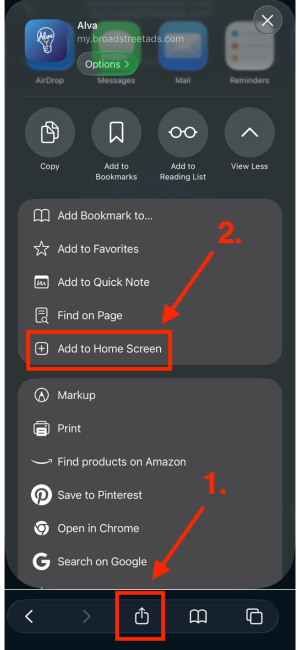
iPhone (iOS)
- Tap the Share icon in Safari.
- Select Add to Home Screen.
- Tap Add.
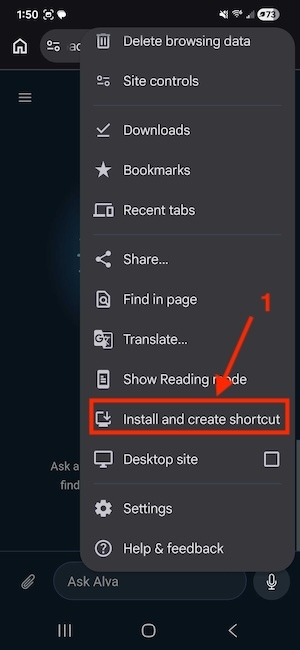
Android
- Tap the browser menu (⋮) in Chrome.
- Select Add to Home Screen or Install App (the wording may vary by device).
- Tap Add or Install to confirm.
Once installed, simply tap the Alva icon on your home screen whenever you need to:
- Generate a report
- Check upcoming campaign expirations
- Create a spec ad
- Get answers to your Broadstreet questions
Alva is always ready to help—wherever your work takes you.